
pynibs.hdf5_io package
The hdf5_io subpackage provides utilities for reading and writing data in the HDF5 format, as well as generating XDMF files for visualization of the data. It includes functions for writing surface data, creating XDMF files for surfaces and fibers, overlaying data stored in HDF5 files, and writing coordinates to an XDMF file for visualization. This subpackage is primarily used for handling and visualizing data related to neuroimaging and brain stimulation studies.
Submodules
pynibs.hdf5_io.hdf5_io module
This module contains functions to read and write .hdf5 files.
- pynibs.hdf5_io.hdf5_io.create_fibre_geo_hdf5(fn_fibres_hdf5, overwrite=True)
Reformats geometrical fibre data and adds a /plot subfolder containing geometrical fibre data including connectivity
- pynibs.hdf5_io.hdf5_io.hdf_2_ascii(hdf5_fn)
Prints out structure of given .hdf5 file.
- Parameters:
hdf5_fn (str) – Filename of .hdf5 file.
- Returns:
h5 – Structure of .hdf5 file.
- Return type:
items
- pynibs.hdf5_io.hdf5_io.load_mesh_hdf5(fname)
Loading mesh from .hdf5 file and setting up
TetrahedraLinearclass.- Parameters:
fname (str) – Name of .hdf5 file (incl. path)
- Returns:
obj –
TetrahedraLinearobject- Return type:
Example
.hdf5 file format and contained groups. The content of .hdf5 files can be shown using the tool HDFView (https://support.hdfgroup.org/products/java/hdfview/)
mesh
I---/elm
I    I--/elm_number          [1,2,3,...,N_ele]           Running index over all elements starting at 1,
                                                            triangles and tetrahedra
I    I--/elm_type            [2,2,2,...,4,4]             Element type: 2 triangles, 4 tetrahedra
I    I--/node_number_list    [1,5,6,0;... ;1,4,8,9]      Connectivity of triangles [X, X, X, 0] and tetrahedra
                                                                    [X, X, X, X]
I    I--/tag1                [1001,1001, ..., 4,4,4]     Surface (100X) and domain (X) indices with 1000 offset
                                                                     for surfaces
I    I--/tag2                [   1,   1, ..., 4,4,4]     Surface (X) and domain (X) indices w/o offset
I
I---/nodes
I    I--/node_coord          [1.254, 1.762, 1.875;...]   Node coordinates in (mm)
I    I--/node_number         [1,2,3,...,N_nodes]         Running index over all points starting at 1
I    I--/units               ["mm"]                      .value is unit of geometry
I
I---/fields
I    I--/E/value             [E_x_1, E_y_1, E_z_1;...]   Electric field in all elms, triangles and tetrahedra
I    I--/J/value             [J_x_1, J_y_1, J_z_1;...]   Current density in all elms, triangles and tetrahedra
I    I--/normE/value         [normE_1,..., normE_N_ele]  Magnitude of electric field in all elements,
                                                                    triangles and tetrahedra
I    I--/normJ/value         [normJ_1,..., normJ_N_ele]  Magnitude of current density in all elements,
                                                                    triangles and tetrahedra

/data
I---/potential               [phi_1, ..., phi_N_nodes]   Scalar electric potential in nodes (size N_nodes)
I---/dAdt                    [A_x_1, A_y_1, A_z_1,...]   Magnetic vector potential (size 3xN_nodes)
- pynibs.hdf5_io.hdf5_io.load_mesh_msh(fname)
Loading mesh from .msh file and return
TetrahedraLinearobject.- Parameters:
fname (str) – .msh filename (incl. path)
- Returns:
obj
- Return type:
- pynibs.hdf5_io.hdf5_io.msh2hdf5(fn_msh=None, skip_roi=False, skip_layer=True, include_data=False, approach='mri2mesh', subject=None, mesh_idx=None)
Transforms mesh from .msh to .hdf5 format. Mesh is read from subject object or from fn_msh.
- Parameters:
fn_msh (str, optional) – Filename of .msh file.
skip_roi (bool, default: False) – Skip generating ROI in .hdf5
skip_layer (bool, default: True) – Don’t create gm layers.
include_data (bool, default: False) – Also convert data in .msh file to .hdf5 file
subject (pynibs.Subject, optional) – Subject information, must be set to use skip_roi=False.
mesh_idx (int or list of int or str or list of str, optional) – Mesh index, the conversion from .msh to .hdf5 is conducted for.
approach (str) –
Approach the headmodel was created with (“mri2mesh” or “headreco”).
Deprecated since version 0.0.1: Not supported anymore.
- Returns:
<File> – .hdf5 file with mesh information
- Return type:
.hdf5 file
- pynibs.hdf5_io.hdf5_io.print_attrs(name, obj)
Helper function for
hdf_2_ascii(). To be called fromh5py.Group.visititems()
- pynibs.hdf5_io.hdf5_io.read_arr_from_hdf5(fn_hdf5, folder)
Reads array from and .hdf5 files and returns as list: Strings are returned as np.bytes_ to str and ‘None’ to None
- pynibs.hdf5_io.hdf5_io.read_data_hdf5(fname)
Reads phi and dA/dt data from .hdf5 file (phi and dAdt are given in the nodes).
- Parameters:
fname (str) – Filename of .hdf5 data file.
- Returns:
phi (np.ndarray of float [N_nodes]) – Electric potential in the nodes of the mesh.
da_dt (np.ndarray of float [N_nodesx3]) – Magnetic vector potential in the nodes of the mesh.
- pynibs.hdf5_io.hdf5_io.read_dict_from_hdf5(fn_hdf5, folder)
Read all arrays from from hdf5 file and return them as dict
- pynibs.hdf5_io.hdf5_io.simnibs_results_msh2hdf5(fn_msh, fn_hdf5, S, pos_tms_idx, pos_local_idx, subject, mesh_idx, mode_xdmf='r+', n_cpu=4, verbose=False, overwrite=False, mid2roi=False)
Converts simnibs .msh results file(s) to .hdf5 / .xdmf tuple.
- Parameters:
fn_msh (str list of str) – Filenames (incl. path) of .msh results files from SimNIBS.
fn_hdf5 (str or list of str) – Filenames (incl. path) of .hdf5 results files.
S (Simnibs Session object) – Simnibs Session object the simulations are conducted with.
pos_tms_idx (list of int) – Index of the simulation w.r.t. to the simnibs TMSList (inside Session object S). For every coil a separate TMSList exists, which contains multiple coil positions.
pos_local_idx (list of int) – Index of the simulation w.r.t. to the simnibs POSlist in the TMSList (inside Session object S) For every coil a separate TMSList exists, which contains multiple coil positions.
subject (pynibs.subject.Subject) – Subject object.
mode_xdmf (str, default: "r+") – Mode to open hdf5_geo file to write xdmf. If hdf5_geo is already separated in tets and tris etc., the file is not changed, use “r” to avoid IOErrors in case of parallel computing.
n_cpu (int) – Number of processes.
verbose (bool, default: False) – Print output messages.
overwrite (bool, default: False) – Overwrite .hdf5 file if existing.
mid2roi (bool or string, default: False) – If the mesh contains ROIs and the e-field was calculated in the midlayer using simnibs (
S.map_to_surf = True), the midlayer results will be mapped from the simnibs midlayer to the ROIs (takes some time for large ROIs).
- Returns:
<File> – .hdf5 file containing the results. An .xdmf file is also created to link the results with the mesh .hdf5 file of the subject.
- Return type:
.hdf5 file
- pynibs.hdf5_io.hdf5_io.simnibs_results_msh2hdf5_workhorse(fn_msh, fn_hdf5, session, pos_tms_idx, pos_local_idx, subject, mesh_idx, mode_xdmf='r+', verbose=False, overwrite=False, mid2roi=False)
Converts simnibs .msh results file to .hdf5 (including midlayer data if desired)
- Parameters:
fn_msh (list of str) – Filenames of .msh results files from SimNIBS.
fn_hdf5 (str or list of str) – Filenames of .hdf5 results files.
session (Simnibs Session object) – Simnibs session the simulations were conducted with.
pos_tms_idx (list of int) – Index of the simulation w.r.t. to the simnibs TMSList (inside
session). For every coil a separate TMSList exists, which contains multiple coil positions.pos_local_idx (list of int) – Index of the simulation w.r.t. to the simnibs POSlist in the TMSList (inside
session). For every coil a separate TMSList exists, which contains multiple coil positions.subject (Subject object) – pynibs.Subject.
mode_xdmf (str, default: "r+") – Mode to open hdf5_geo file to write xdmf. If hdf5_geo is already separated in tets and tris etc., the file is not changed, use “r” to avoid IOErrors in case of parallel computing.
verbose (bool, default: False) – Print output messages.
overwrite (bool, default: False) – Overwrite .hdf5 file if existing.
mid2roi (bool, list of string, or string, default: False) – If the mesh contains ROIs and the e-field was calculated in the midlayer using SimNIBS (
S.map_to_surf = True), the midlayer results will be mapped from the simnibs midlayer to the ROIs (takes some time for large ROIs).
- Returns:
<File> – .hdf5 file containing the results. An .xdmf file is also created to link the results with the mesh .hdf5 file of the subject.
- Return type:
.hdf5 file
- pynibs.hdf5_io.hdf5_io.split_hdf5(hdf5_in_fn, hdf5_geo_out_fn='', hdf5_data_out_fn=None)
Splits one hdf5 into one with spatial data and one with statistical data. If coil data is present in
hdf5_in, it is saved inhdf5Data_out. If new spatial data is added to file (curve, inflated, whatever), add this to the geogroups variable.- Parameters:
- Returns:
<File> (.hdf5 file) – hdf5Geo_out_fn (spatial data).
<File> (.hdf5 file) – hdf5Data_out_fn (data).
- pynibs.hdf5_io.hdf5_io.write_arr_to_hdf5(fn_hdf5, arr_name, data, overwrite_arr=True, verbose=False, check_file_exist=False)
Takes an array and adds it to an hdf5 file.
If data is list of dict,
write_dict_to_hdf5()is called for each dict with adapted hdf5-folder name Otherwise, data is casted to np.ndarray and dtype of unicode data casted to'|S'.
- pynibs.hdf5_io.hdf5_io.write_coil_hdf5(tms_coil, fn)
Creates .hdf5/.xdmf file tuples with information to visualize SimNIBS .tcd coil information.
Can be visualized with ParaView (use Glyph plugin to view wires).

SimNIBS .tcd coil model from create_two_stimulator_coil.py visualized with ParaView.
- Parameters:
- Returns:
fn.hdf5/fn.xdmf (<file>) – Paraview file tuple with casing data.
fn_wires.hdf5/fn_wires.xdmf (<file>) – Paraview file tuple with wiring data.
- pynibs.hdf5_io.hdf5_io.write_data_hdf5(out_fn, data, data_names, hdf5_path='/data', mode='a')
Creates a .hdf5 file with data.
- Parameters:
out_fn (str) – Filename of output .hdf5 file containing the geometry information.
data (np.ndarray or list of nparrays of float) – Data to save in hdf5 data file.
hdf5_path (str, default: '/data') – Folder in .hdf5 geometry file, where the data is saved in.
mode (str, default: "a") – Mode: “a” append, “w” write (overwrite).
- Returns:
<File> – File containing the stored data.
- Return type:
.hdf5 file
Example
File structure of .hdf5 data file
data
|---/data_names[0]          [data[0]]           First dataset
|---/    ...                   ...                  ...
|---/data_names[N-1]        [data[N-1]]         Last dataset
- pynibs.hdf5_io.hdf5_io.write_data_hdf5_surf(data, data_names, data_hdf_fn_out, geo_hdf_fn, replace=False, replace_array_in_file=True, datatype='tris')
Saves surface data to .hdf5 data file and generates corresponding .xdmf file linking both. The directory of data_hdf_fn_out and geo_hdf_fn should be the same, as only basenames of files are stored in the .xdmf file.
- Parameters:
data (np.ndarray or list) – (N_points_ROI, N_components) Data to map on surfaces.
data_hdf_fn_out (str) – Filename of .hdf5 data file.
geo_hdf_fn (str) – Filename of .hdf5 geo file containing the geometry information (has to exist).
replace (bool, default: False) – Replace existing .hdf5 and .xdmf file completely.
replace_array_in_file (bool, default: True) – Replace existing array in file.
datatype (str, default: 'tris') – Triangle or node data.
- Returns:
<File> (.hdf5 file) – data_hdf_fn_out.hdf5 containing data
<File> (.xdmf file) – data_hdf_fn_out.xdmf containing information about .hdf5 file structure for Paraview
Example
File structure of .hdf5 data file
/data
|---/tris
|      |---dataset_0    [dataset_0]    (size: N_dataset_0 x M_dataset_0)
|      |---   ...
|      |---dataset_K   [dataset_K]     (size: N_dataset_K x M_dataset_K)
- pynibs.hdf5_io.hdf5_io.write_data_hdf5_vol(data, data_names, data_hdf_fn_out, geo_hdf_fn, replace=False, replace_array_in_file=True)
Saves surface data to .hdf5 data file and generates corresponding .xdmf file linking both. The directory of data_hdf_fn_out and geo_hdf_fn should be the same, as only basenames of files are stored in the .xdmf file.
- Parameters:
data (np.ndarray or list) – (N_points_ROI, N_components) Data to map on surfaces.
data_hdf_fn_out (str) – Filename of .hdf5 data file.
geo_hdf_fn (str) – Filename of .hdf5 geo file containing the geometry information (has to exist).
replace (bool, default: False) – Replace existing .hdf5 and .xdmf file completely.
replace_array_in_file (bool, default: True) – Replace existing array in file.
- Returns:
<File> (.hdf5 file) – data_hdf_fn_out.hdf5 containing data
<File> (.xdmf file) – data_hdf_fn_out.xdmf containing information about .hdf5 file structure for Paraview.
Example
File structure of .hdf5 data file
/data
|---/tris
|      |---dataset_0    [dataset_0]    (size: N_dataset_0 x M_dataset_0)
|      |---   ...
|      |---dataset_K   [dataset_K]     (size: N_dataset_K x M_dataset_K)
- pynibs.hdf5_io.hdf5_io.write_dict_to_hdf5(fn_hdf5, data, folder, check_file_exist=False, verbose=False)
Takes dict (from subject.py) and passes its keys to write_arr_to_hdf5()
fn_hdf5:folder/
              |--key1
              |--key2
              |...
- pynibs.hdf5_io.hdf5_io.write_geo_hdf5(out_fn, msh, roi_dict=None, hdf5_path='/mesh')
Creates a .hdf5 file with geometry data from mesh including region of interest(s).
- Parameters:
out_fn (str) – Output hdf5 filename for mesh’ geometry information.
msh (pynibs.mesh.mesh_struct.TetrahedraLinear) – Mesh to write to file.
roi_dict (dict of (
RegionOfInterestSurfaceorRegionOfInterestVolume)) – Region of interest (surface and/or volume) information.hdf5_path (str, default: '/mesh') – Path in output file to store geometry information.
- Returns:
<File> – File containing the geometry information
- Return type:
.hdf5 file
Example
File structure of .hdf5 geometry file
mesh
I---/elm
I    I--/elm_number             [1,2,3,...,N_ele]        Running index over all elements starting at 1
                                                            (triangles and tetrahedra)
I    I--/elm_type               [2,2,2,...,4,4]          Element type: 2 triangles, 4 tetrahedra
I    I--/tag1                [1001,1001, ..., 4,4,4]     Surface (100X) and domain (X) indices with 1000
                                                                    offset for surfaces
I    I--/tag2                [   1,   1, ..., 4,4,4]     Surface (X) and domain (X) indices w/o offset
I    I--/triangle_number_list   [1,5,6;... ;1,4,8]       Connectivity of triangles [X, X, X]
I    I--/tri_tissue_type        [1,1, ..., 3,3,3]        Surface indices to differentiate between surfaces
I    I--/tetrahedra_number_list [1,5,6,7;... ;1,4,8,12]  Connectivity of tetrahedra [X, X, X, X]
I    I--/tet_tissue_type        [1,1, ..., 3,3,3]        Volume indices to differentiate between volumes
I    I--/node_number_list       [1,5,6,0;... ;1,4,8,9]   Connectivity of triangles [X, X, X, 0] and
                                                            tetrahedra [X, X, X, X]
I
I---/nodes
I    I--/node_coord          [1.254, 1.762, 1.875;...]   Node coordinates in (mm)
I    I--/node_number         [1,2,3,...,N_nodes]         Running index over all points starting at 1
I    I--/units               ['mm']                      .value is unit of geometry

roi_surface
I---/0                                                           Region of Interest number
I    I--/node_coord_up              [1.254, 1.762, 1.875;...]    Coordinates of upper surface points
I    I--/node_coord_mid             [1.254, 1.762, 1.875;...]    Coordinates of middle surface points
I    I--/node_coord_low             [1.254, 1.762, 1.875;...]    Coordinates of lower surface points
I    I--/tri_center_coord_up        [1.254, 1.762, 1.875;...]    Coordinates of upper triangle centers
I    I--/tri_center_coord_mid       [1.254, 1.762, 1.875;...]    Coordinates of middle triangle centers
I    I--/tri_center_coord_low       [1.254, 1.762, 1.875;...]    Coordinates of lower triangle centers
I    I--/node_number_list           [1,5,6,0;... ;1,4,8,9]       Connectivity of triangles [X, X, X]
I    I--/delta                      0.5                          Distance parameter between GM and WM surface
I    I--/tet_idx_tri_center_up      [183, 913, 56, ...]          Tetrahedra indices where triangle center of
                                                                    upper surface are lying in
I    I--/tet_idx_tri_center_mid     [185, 911, 58, ...]          Tetrahedra indices where triangle center of
                                                                    middle surface are lying in
I    I--/tet_idx_tri_center_low     [191, 912, 59, ...]          Tetrahedra indices where triangle center of
                                                                    lower surface are lying in
I    I--/tet_idx_node_coord_mid     [12, 15, 43, ...]            Tetrahedra indices where the node_coords_mid
                                                                    are lying in
I    I--/gm_surf_fname              .../surf/lh.pial             Filename of GM surface from segmentation
I    I--/wm_surf_fname              .../surf/lh.white            Filename of WM surface from segmentation
I    I--/layer                      3                            Number of layers
I    I--/fn_mask                    .../simnibs/mask.mgh         Filename of region of interest mask
I    I--/X_ROI                      [-10, 15]                    X limits of region of interest box
I    I--/Y_ROI                      [-10, 15]                    Y limits of region of interest box
I    I--/Z_ROI                      [-10, 15]                    Z limits of region of interest box
I
I---/1
I    I ...

roi_volume
I---/0                                                           Region of Interest number
I    I--/node_coord                 [1.254, 1.762, 1.875;...]    Coordinates (x,y,z) of ROI nodes
I    I--/tet_node_number_list       [1,5,6,7;... ;1,4,8,9]       Connectivity matrix of ROI tetrahedra
I    I--/tri_node_number_list       [1,5,6;... ;1,4,8]           Connectivity matrix of ROI triangles
I    I--/tet_idx_node_coord         [183, 913, 56, ...]          Tetrahedra indices where ROI nodes are
I    I--/tet_idx_tetrahedra_center  [12, 15, 43, ...]            Tetrahedra indices where center points of
                                                                    ROI tetrahedra are
I    I--/tet_idx_triangle_center    [12, 15, 43, ...]            Tetrahedra indices where center points of
                                                                    ROI triangles are

I---/1
I    I ...
- pynibs.hdf5_io.hdf5_io.write_geo_hdf5_surf(out_fn, points, con, replace=False, hdf5_path='/mesh')
Creates a .hdf5 file with geometry data from midlayer.
- Parameters:
out_fn (str) – Filename of output .hdf5 file containing the geometry information.
points (np.ndarray) – (N_points, 3) Coordinates of nodes (x,y,z).
con (np.ndarray) – (N_tri, 3) Connectivity list of triangles.
replace (bool) – Replace .hdf5 geometry file (True / False).
hdf5_path (str, default: '/mesh') – Folder in .hdf5 geometry file, where the geometry information is saved in.
- Returns:
<File> – File containing the geometry information.
- Return type:
.hdf5 file
Example
File structure of .hdf5 geometry file:
mesh
|---/elm
|    |--/triangle_number_list   [1,5,6;... ;1,4,8]      Connectivity of triangles [X, X, X]
|    |--/tri_tissue_type        [1,1, ..., 3,3,3]       Surface indices to differentiate between surfaces
|
|---/nodes
|    |--/node_coord             [1.2, 1.7, 1.8; ...]    Node coordinates in (mm)
- pynibs.hdf5_io.hdf5_io.write_geo_hdf5_vol(out_fn, points, con, replace=False, hdf5_path='/mesh')
Creates a .hdf5 file with geometry data from midlayer.
- Parameters:
out_fn (str) – Filename of output .hdf5 file containing the geometry information.
points (np.ndarray) – (N_points, 3) Coordinates of nodes (x,y,z).
con (np.ndarray) – (N_tri, 3) Connectivity list of triangles.
replace (bool) – Replace .hdf5 geometry file (True / False).
hdf5_path (str, default: '/mesh') – Folder in .hdf5 geometry file, where the geometry information is saved in.
- Returns:
<File> – File containing the geometry information.
- Return type:
.hdf5 file
Example
File structure of .hdf5 geometry file:
mesh
|---/elm
|    |--/triangle_number_list   [1,5,6;... ;1,4,8]      Connectivity of triangles [X, X, X]
|    |--/tri_tissue_type        [1,1, ..., 3,3,3]       Surface indices to differentiate between surfaces
|
|---/nodes
|    |--/node_coord             [1.2, 1.7, 1.8; ...]    Node coordinates in (mm)
pynibs.hdf5_io.xdmf module
The xdmf.py module provides utilities for creating, writing, and manipulating XDMF files. XDMF (eXtensible Data Model and Format) is a format that allows for the exchange of scientific data between High Performance Computing codes and tools for visualization, analysis, and data processing.
The module includes functions for:
Writing XDMF files for surfaces, such as ROIs (write_xdmf_surf).
Creating XDMF markup files for given HDF5 files, mainly for paraview visualization (write_xdmf).
Creating XDMF markup files for given ROI HDF5 data files with 4D data (write_temporal_xdmf).
Creating one XDMF file that allows paraview plottings of coil position paths (create_position_path_xdmf).
Overlaying data stored in HDF5 files except in regions where data_substitute is found (data_superimpose).
Writing the coordinates to an XDMF file for visualization (write_xdmf_coordinates).
Creating XDMF file to plot fibres in Paraview (create_fibre_xdmf).
This module is primarily used for handling and visualizing data related to neuroimaging and brain stimulation studies.
- pynibs.hdf5_io.xdmf.create_fibre_xdmf(fn_fibre_geo_hdf5, fn_fibre_data_hdf5=None, overwrite=True, fibre_points_path='fibre_points', fibre_con_path='fibre_con', fibre_data_path='')
Creates .xdmf file to plot fibres in Paraview
- Parameters:
fn_fibre_geo_hdf5 (str) – Path to fibre_geo.hdf5 file containing the geometry (in /plot subfolder created with create_fibre_geo_hdf5())
fn_fibre_data_hdf5 (str (optional) default: None) – Path to fibre_data.hdf5 file containing the data to plot (in parent folder)
fibre_points_path (str (optional) default: fibre_points) – Path to fibre point array in .hdf5 file
fibre_con_path (str (optional) default: fibre_con) – Path to fibre connectivity array in .hdf5 file
fibre_data_path (str (optional) default: "") – Path to parent data folder in data.hdf5 file (Default: no parent folder)
- Returns:
<File>
- Return type:
.xdmf file for Paraview
- pynibs.hdf5_io.xdmf.create_position_path_xdmf(sorted_fn, coil_pos_fn, output_xdmf, stim_intens=None, coil_sorted='/0/0/coil_seq')
Creates one .xdmf file that allows paraview plottings of coil position paths.
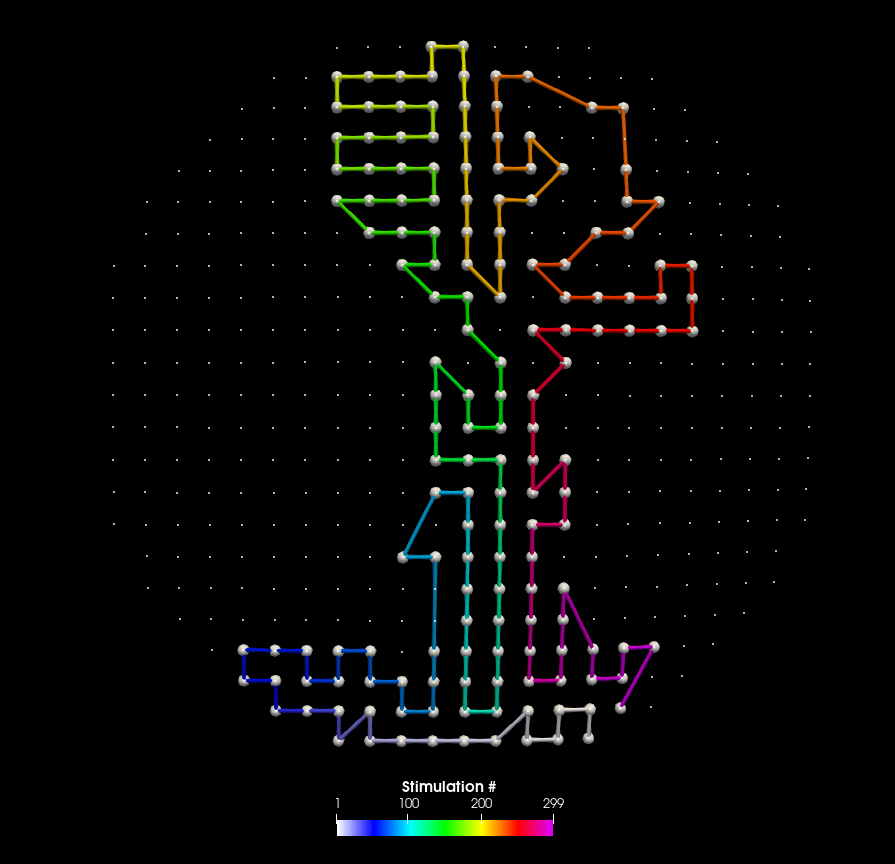
Paraview can be used to visualize the order of realized stimulation positions.
- Parameters:
sorted_fn (str) – .hdf5 filename with position indices, values, intensities from
pynibs.sort_opt_coil_positions().coil_pos_fn (str) – .hdf5 filename with original set of coil positions. Indices from sorted_fn are mapped to this. Either ‘/matsimnibs’ or ‘m1’ and ‘m2’ datasets.
output_xdmf (str) –
stim_intens (int, optional) – Intensities are multiplied by this factor.
coil_sorted (str) – Path to coil positions in sorted_fn
- Returns:
output_xdmf
- Return type:
<file>
- pynibs.hdf5_io.xdmf.data_superimpose(fn_in_hdf5_data, fn_in_geo_hdf5, fn_out_hdf5_data, data_hdf5_path='/data/tris/', data_substitute=-1, normalize=False)
Overlaying data stored in .hdf5 files except in regions where data_substitute is found. These points are omitted in the analysis and will be replaced by data_substitute instead.
- Parameters:
fn_in_hdf5_data (list of str) – Filenames of .hdf5 data files with common geometry, e.g. generated by pynibs.data_sub2avg(…).
fn_in_geo_hdf5 (str) – Geometry .hdf5 file, which corresponds to the .hdf5 data files.
fn_out_hdf5_data (str) – Filename of .hdf5 data output file containing the superimposed data.
data_hdf5_path (str) – Path in .hdf5 data file where data is stored (e.g.
'/data/tris/').data_substitute (float or np.NaN, default: -1) – Data substitute with this number for all points in the inflated brain, which do not belong to the given data set.
normalize (bool or str, default: False) –
Decide if individual datasets are normalized w.r.t. their maximum values before they are superimposed.
’global’: global normalization w.r.t. maximum value over all datasets and subjects
’dataset’: dataset wise normalization w.r.t. maximum of each dataset individually (over subjects)
’subject’: subject wise normalization (over datasets)
- Returns:
<File> – Overlayed data.
- Return type:
.hdf5 file
- pynibs.hdf5_io.xdmf.write_coil_sequence_xdmf(coil_pos_fn, data, vec1, vec2, vec3, output_xdmf)
- pynibs.hdf5_io.xdmf.write_temporal_xdmf(hdf5_fn, data_folder='c', coil_center_folder=None, coil_ori_0_folder=None, coil_ori_1_folder=None, coil_ori_2_folder=None, coil_current_folder=None, hdf5_geo_fn=None, overwrite_xdmf=True, verbose=False, xdmf_fn=None)
Creates .xdmf markup file for given ROI hdf5 data file with 4D data. This was written to be able to visualize data from the permutation analysis of the regression approach It expects an .hdf5 with a data group with (many) subarrays. The N subarrays name should be named from 0 to N-1 Each subarray has shape
(N_elemns, 1)Not tested for whole brain.
hdf5:/data_folder/0
                 /1
                 /2
                 /3
                 /4
                 ...
- Parameters:
hdf5_fn (str) – Filename of hdf5 file containing the data.
data_folder (str or list of str) – Path within hdf5 to group of dataframes.
hdf5_geo_fn (str, optional) – Filename of hdf5 file containing the geometry.
overwrite_xdmf (bool, default: False) – Overwrite existing .xdmf file if present.
coil_center_folder (str, optional) –
coil_ori_0_folder (str, optional) –
coil_ori_1_folder (str, optional) –
coil_ori_2_folder (str, optional) –
coil_current_folder (str, optional) –
xdmf_fn (str, optional) – Filename of the temporal xdmf file. If not given, created from hdf5 hdf5_fn.
verbose (bool, default: False) – Print output or not.
- Returns:
<File> – hdf5_fn[-4].xdmf
- Return type:
.xdmf file
- pynibs.hdf5_io.xdmf.write_xdmf(hdf5_fn, hdf5_geo_fn=None, overwrite_xdmf=False, overwrite_array=False, verbose=False, mode='r+')
Creates .xdmf markup file for given hdf5 file, mainly for paraview visualization. Checks if triangles and tetrahedra already exists as distinct arrays in
hdf5_fn. If not, these are added to the .hdf5 file and rebased to 0 (from 1). If onlyhdf5_fnis provided, spatial information has to be present as arrays for tris and tets in this dataset.- Parameters:
hdf5_fn (str) – Filename of hdf5 file containing the data
hdf5_geo_fn (str, optional) – Filename of hdf5 file containing the geometry
overwrite_xdmf (bool, default: False) – Overwrite existing xdmf file if present.
overwrite_array (bool, default: False) – Overwrite existing arrays if present
verbose (bool) – Print output.
mode (str, default: "r+") – Mode to open hdf5_geo file. If hdf5_geo is already separated in tets and tris etc., nothing has to be written, use “r” to avoid IOErrors in case of parallel computing.
- Returns:
fn_xml (str) – Filename of the created .xml file
<File> (.xdmf file) – hdf5_fn[-4].xdmf (only data if hdf5Geo_fn provided)
<File> (.hdf5 file) – hdf5_fn changed if neccessary
<File> (.hdf5 file) – hdf5geo_fn containing spatial data
- pynibs.hdf5_io.xdmf.write_xdmf_coordinates(fn_xdmf, coords_center)
Writes the coordinates to an XDMF file for visualization.
- Parameters:
fn_xdmf (str) – The filename of the XDMF file to be written.
coords_center (np.ndarray) – The coordinates to be written to the XDMF file. This should be a 2D array where each row represents a point in 3D space.
- pynibs.hdf5_io.xdmf.write_xdmf_surf(data_hdf_fn_out, data_names, data_xdmf_fn, geo_hdf_fn, data_dims, data_in_tris=True, data_prefix='/data/tris/')
Write XDMF files for surfaces, such as ROIs.
- Parameters:
- Returns:
<File> – Descriptor file pointing to geo and data .hdf5 files
- Return type:
.xdmf file